← LibraryTAKESHI / COLOMBO 2026EN日本語

🇱🇰 Slack Community: Colombo Chapter

Ask, don't search. 🇱🇰

Practical Slackbot for Salesforce Admins and Developers

Takeshi Hiratsuka Leave a Nest Knowledge Co., Ltd. · Tokyo, Japan
September 9, 2026 · 7:00–8:00 PM IST (GMT+5:30)

Sourcehttps://marreta27.me/slackbot-data360/ (Slackbot × Data 360, Salesforce Developer Group Orlando, Aug 2026)
1

Ice breaker

Two questions.
Answer in the chat.

  1. Do you use Slack every day?
  2. Have you talked to the new Slackbot?

1 / 2 / both / neither

Before we start

How do you talk
to your family?

WhatsApp? LINE? iMessage? Tell us in the chat.

Sourcehttps://slack.com/pricing (Slack plans)
3

Before we start

Slack Pro Plan connects me with my family!
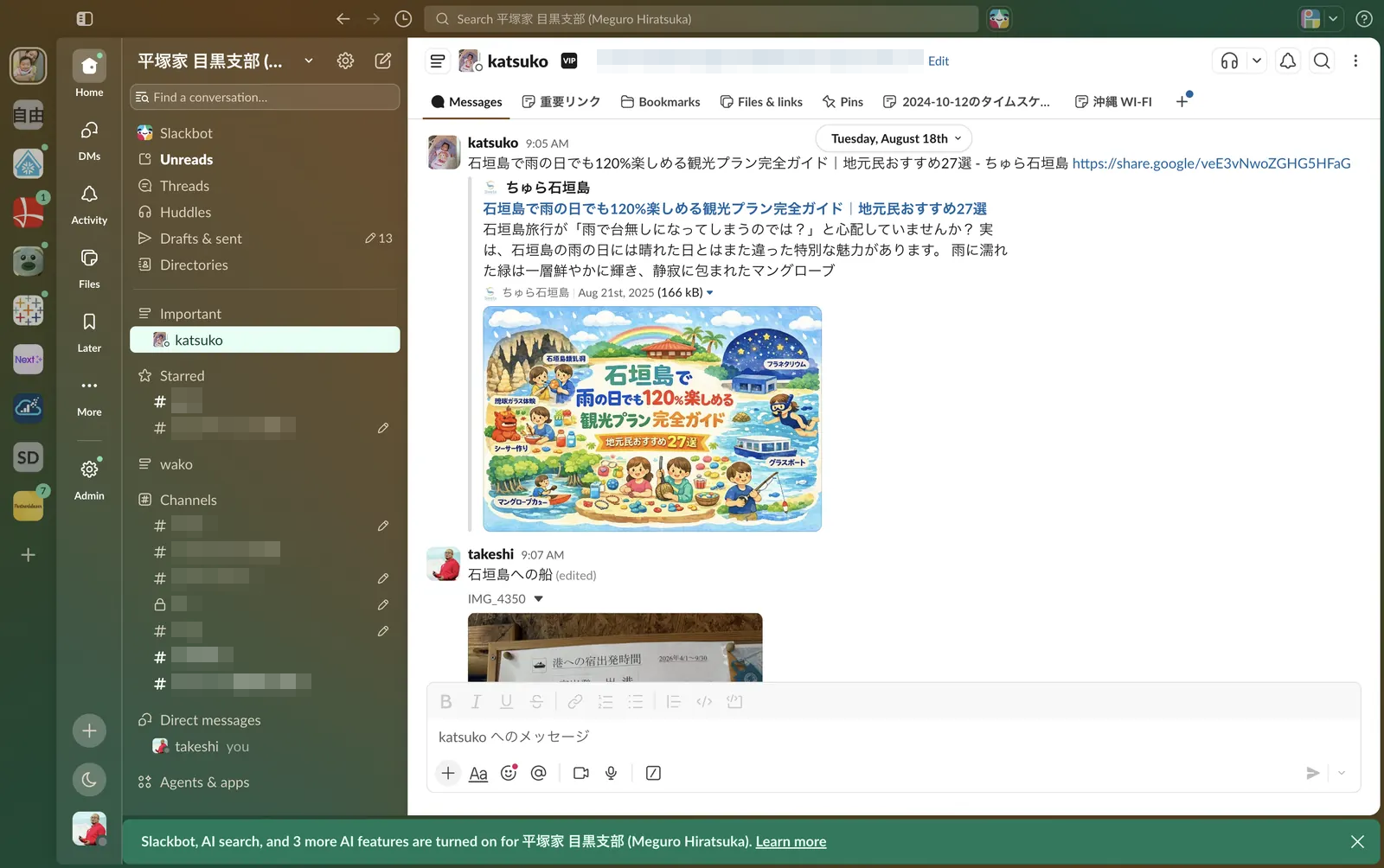
Slack workspace shared with my wife, with channel names and the header email address pixelated

I like Slack so much that my wife and I have our own workspace. On the Pro plan, of course.

Sourcehttps://slack.com/pricing (Slack plans)
4

Who is talking

Takeshi Hiratsuka

Takeshi Hiratsuka 平塚 武

Board Member, Leave a Nest Knowledge Co., Ltd. · Tokyo
Salesforce Architect · Founder, Data 360 AI Lab

Global conference stages

  • Dreamforce 2025
  • TDX 2026
  • Tableau Conference 2026
  • Salesforce Developer Group, Orlando Aug 2026
  • Slack Community, Colombo Sep 9, 2026
DATA Saber Datablazer DataFam Rising Stars Snowflake Squad Tableau Ambassador 2026
Sourcehttps://marreta27.me/slackbot-data360/ (Slackbot × Data 360, Orlando, Aug 2026)
5

Where Slack sits

Slack is the system of engagement
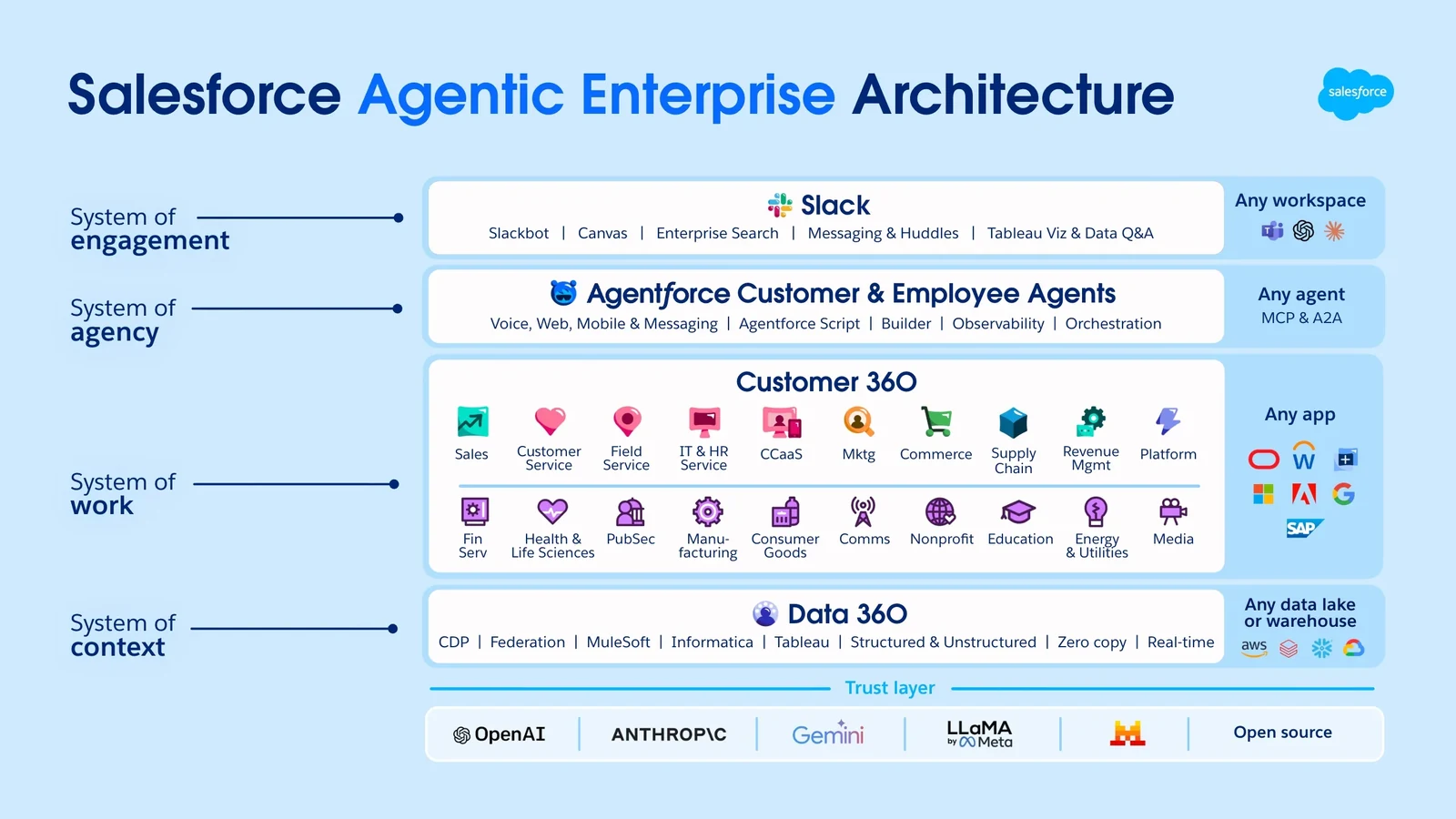
Salesforce Agentic Enterprise Architecture: Slack as system of engagement, Agentforce as system of agency, Customer 360 as system of work, Data 360 as system of context, over a trust layer.

Slackbot lives in the top layer. It reaches the work below it, and the context below that.

Sourcehttps://www.salesforce.com/blog/frontier/ (Salesforce, Agentic Enterprise Architecture)
6

Same name, different thing

Two Slackbots

Early daysReminders, custom responses. All plans.
Oct 2025Announced at Dreamforce
Jan 13, 2026GA: Business+, Enterprise+
Mar–Apr 202630+ new features
Jul 29, 2026Surfaces and other advanced features

The name stayed. Everything else became a personal AI agent.

What it does

Five things Slackbot does today

1 FindSearch and summarize across channels, threads, files
2 CreateCanvases, drafts, agendas
3 RunRecurring tasks, skills
4 ConnectSalesforce, Data 360, tools via MCP
5 BuildSurfaces: reports, dashboards

One rule: it only sees what you can see.

Before you try it

Slackbot by plan

Free, ProPreview only
Business+15 messages per member per week
Enterprise+No weekly message cap; usage policies apply
Salesforce org connectedFlex Credits extend Free, Pro and Business+
  • Skills: Free requires Flex Credits
  • Tasks: up to 3 automatic runs a day

Use case 1

🌅 ☕ ⏰

01Morning

Set the meeting without opening a calendar.

Slackbot reads your calendar · 2 slides + demo

🌅 Use case 1: Morning

"Find a slot with George and Yuji this week and set it up."

Before

  • Open three calendars
  • Hunt for a free 30 minutes
  • Create the event, invite, notify

With Slackbot

  • One ask, in the DM you are already in
  • It checks all three calendars and proposes slots
  • You pick one. It sets the meeting up

GA Calendar actions require connected Google / Microsoft accounts and enterprise search

🌅 Use case 1: Morning

Demo walkthrough

Calendar scheduling

Ask for a slot with George and Yuji. Watch Slackbot check three calendars and set the meeting.

Session walkthrough. No recording is embedded.

🌅 Use case 1: Morning

Point Slackbot at the context

Vague"Make an agenda for my meeting with @George and @Yuji."
Grounded"Agenda for Thursday with @George and @Yuji, from #q3-launch since Sep 2 and our last meeting canvas."
Vague"What needs my attention?"
Grounded"Which DMs or mentions do I need to follow up on this morning?"

Name the channel, the file, the record.

Use case 2

🌇 📝 ✅

02Evening

Stop writing the daily report.

Recurring tasks and skills · 2 slides + demo

🌇 Use case 2: Evening

Stop writing the daily report

The habit

18:00. Open a doc. Rebuild the day from memory.

The idea

The day already happened in Slack. The report is generated from it. You add one line.

Recurring tasks + skills

🌇 Use case 2: Evening

A task that runs itself

  1. Tasks tab: "Every weekday at 18:00, summarize my messages, threads and decisions. Post to #daily-report."
  2. Slackbot drafts it. You confirm.
  3. Optional: a skill fixes the format for the team.

GA 3 automatic runs/day · Free skills require Flex Credits

🌇 Use case 2: Evening

Demo walkthrough

Recurring daily report

Create the 18:00 task, run it once, and open #daily-report.

Session walkthrough. No recording is embedded.

Unlearn

Don't search.
Don't write.
Ask.

Slackbot starts from the context you already have.

Use case 3

☀️ 📱 💼

03Daytime

Move a deal forward from your phone.

Salesforce and Slackbot · 3 slides + demo

☀️ Use case 3: Daytime

Manage Opportunities from Slack posts

The post is the input

  • A teammate posts in #acme-deal: "They want a revised quote. Slipping to next month."
  • In the thread: "Update the Acme opportunity from this."
  • Review the change. Confirm. No tab switch.

What makes it possible

  • No MCP needed. A connected org already lets Slackbot read and update records
  • MCP adds reach. Per-object tools, Data 360, Tableau Next
  • Salesforce permissions still apply

GA Eligible Business+ / Enterprise plans; Slackbot and Salesforce access

☀️ Use case 3: Daytime

Demo walkthrough

Update an opportunity

From a post in the channel to an updated Opportunity. Confirm the write.

Session walkthrough. No recording is embedded.

☀️ Use case 3: Daytime

Native Charts: the answer, drawn

"No underlying report built, no waiting for an admin to build one." Slack, Feature Drop, May 29, 2026

  • Ask Slackbot to chart what it just answered
  • Seconds, in the thread, shared with the team

Why an admin should care

The report request that used to land in your queue does not arrive. Your job moves from building the report to making sure the numbers behind it are right.

Official blog: staged rollout, check workspace access Business+ V2 · Business+ V1 (AI) · Enterprise+ V2 · Enterprise Select (AI) · Enterprise Grid (AI)

Sourcehttps://slack.com/blog/news/feature-drop-may2026 (Slackbot Native Charts, May 29, 2026)
22

☀️ Use case 3: Daytime

Demo walkthrough

Chart the answer

Ask for this month's closing opportunities. Then: "chart it."

Session walkthrough. No recording is embedded.

From answer to artifact

First: what is a surface?

An interactive report or dashboard that Slackbot builds when you ask for one.

  • Built from what you can see in Slack, plus connected sources
  • Comes back with themes, trends and suggested actions
  • Stored as a file. Shared by link, or pinned as a tab

Example prompts

  • Summarize weekly support volume for Q2 in an interactive report.
  • Show my pipeline by stage, with the largest opportunities.

Name the data sources in the ask.

From answer to artifact

Where the report goes, and what it will not do

  • Share it in the channel where the question was asked
  • Pin it as a tab: the team stops asking you
  • People can comment on it, in place

Know

  • Static: re-run for fresh data
  • Not in Slack Connect yet
  • Available to members with Slackbot access

GA (Help Center) Confirm Slackbot access and current usage limits

From answer to artifact

Demo walkthrough

Build and share a surface

Ask for a pipeline report. Share it in a channel.

Session walkthrough. No recording is embedded.

From answer to artifact Community practice, not a Slack feature

"SlackHTML": one HTML file that opens inside Slack

  • Term coined by George Yoshida, CIO, Leave a Nest
  • Attach a single-file HTML; it renders in the Slack app
  • Slackbot can generate one

Community observations, Aug–Sep 2026

  • One file: images and scripts inline
  • 1 MB or more for mobile, 10 MB max
  • No JavaScript on mobile
Sourcehttps://note.com/geeorgey/n/n929ff231360d (George Yoshida, Aug 31, 2026, in Japanese)
27

SlackHTML

Demo walkthrough

Open an HTML attachment

Attach one HTML file. Open it inside Slack.

Session walkthrough. No recording is embedded.

One step further Implementation example

What if you could act, not just check the data?

"Find APAC accounts with a renewal this quarter and no activity in 60 days. Make it a segment for the autumn campaign."

Marketing Cloud Next segments are built on the Unified Individual object in a Data 360 data space. Not a separate audience database.

Discover the tools at runtime

  • search: find segment or activation operations
  • payload_examples: inspect the schema; execute: call the selected tool
  • Requires Data 360, API v66.0+, OAuth and appropriate permissions

Implementation context

Leave a Nest Group architecture
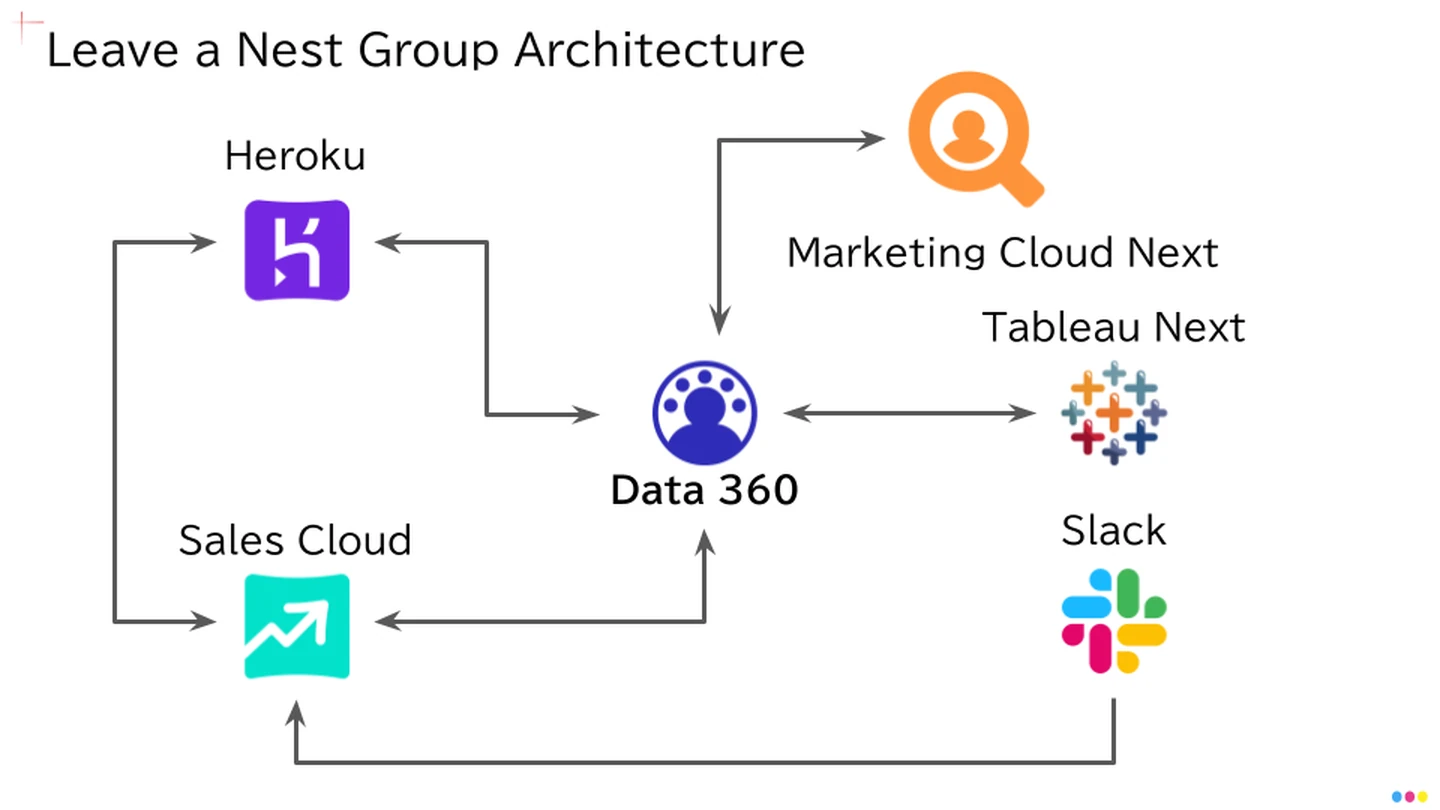
Leave a Nest Group architecture: Heroku, Sales Cloud, Data 360, Marketing Cloud Next, Tableau Next, Slack

Sales Cloud and Heroku supply Data 360. Marketing Cloud Next and Tableau Next use that context, with Slack across the workflow. Architecture from the supplied session material.

Sourcehttps://marreta27.me/slackbot-data360/ (Leave a Nest Group architecture)
30

One step further

Demo walkthrough

Create and review a segment

Define the audience, inspect the matching records, then review publication and activation settings.

Session walkthrough. No recording is embedded.

Implementation example

Behind the action

You Slackbot MCP Data 360 Segment Marketing Cloud Next

The intended flow

  • Discover the operation with search, inspect its payload, then execute
  • Translate the request into filters on Unified Individual
  • Only with tools and data you may use

What decides if the action is right

  • Admins: which MCP server, read or write, for whom
  • Data: identity resolution, meaning of each field
  • Same words, different data, different segment

The action is decided in the layers below Slack. Full story: marreta27.me/slackbot-data360

Tomorrow

Your first step: get an org you can break

1 · Trailhead Quick Start

Connect Your Agentforce Org with Slack. Guided, hands on, one badge.
Trailhead: Quick Start: Connect Your Agentforce Org with Slack

2 · Developer Edition

A free Salesforce Platform environment with Agentforce and Data 360.
Sign up for your Developer Edition: a free Salesforce Platform environment with Agentforce and Data 360

Thank you

Ask, don't search.

Explore the English and Japanese slides, then continue with the related Data 360 session.

Takeshi Hiratsuka Leave a Nest Knowledge Co., Ltd. · Tokyo, Japan
linkedin.com/in/takeshi-hiratsuka

LinkedIn QR code: linkedin.com/in/takeshi-hiratsuka Connect on LinkedIn

Appendix: For Admins Not in the main talk

Turning it on: two steps, then two more

Baseline

  1. Connect the Salesforce org to Slack
  2. Map Slack members to Salesforce users

Optional: finer control and more reach

  1. Add a Salesforce MCP server
  2. Review the tools. Choose who can use them
SObject ReadsSearch, retrieve
SObject MutationsCreate, update
SObject DeletesDelete
SObject AllFull CRUD
Data 360SQL across Data Cloud
Tableau NextBI, semantic layer

Requires Slackbot access, Salesforce permissions and admin configuration

Appendix: For Developers Not in the main talk

Your automation becomes a tool Slackbot can call

Custom MCP servers can expose:

Apex Actions
Lightning Flows
Apex REST
API Catalog
Prompt Builder
Agentforce agents

GA

Backup for Q&A Official announcement; confirm availability

Not shown today

Code ExecutionAnnounced Jul 29, 2026. Plan scope not in Help Center
Slide CreationSame
Image GenerationSame
Surfaces auto-refreshBlog says yes with a skill; Help Center says static

Check Help Center guidance for usage conditions. Label blog announcements and community observations separately.

Backup for Q&A

Trust: what Slack says

  • Slackbot only surfaces what you can already see
  • Customer data is not used to train models
  • Review proposed changes; Salesforce MCP provides governed, auditable access
  • Admins can turn Slackbot on or off org-wide
  • Admins choose the MCP server (read or write) and who uses it
Privacy